


Routes Americas 2026
Rio de Janeiro, Brazil • ExpoRio CIDADE NOVA
• 3 – 5 March 2026
Meetings
Face-to-face meetings form the core of all Routes events, presenting airlines, airports and tourism authorities with an unrivalled platform to negotiate business opportunities.

Attracting the highest concentration of airline decision-makers under one roof, Routes Americas is the place to engage with decision-makers that can expand your network and deliver sustainable growth for your organisation.
Meeting system access schedule for Routes Americas 2026
| Priority access |
Hosted Networking Stands Airlines |
12 January 2026 |
| Advanced access |
Sponsors Routes 360 members with meetings |
19 January 2026 |
| Meeting access |
Airport meeting delegates Tourism meeting delegates |
26 January 2026 |
| Routes 360 supplier access |
Early access for Routes 360 supplier delegates |
18 February 2026 |
| General access |
Supplier delegates (including ACMIs) No meetings delegates |
25 February 2026 |
Meet face-to-face with those who can drive organisational growth
Routes Americas is the catalyst for growth opportunities in regional air connectivity. With over 40 meeting slots available, expect to engage in proactive business development opportunities.
Airlines Attendees






























Airports Attendees






























Destinations Attendees





























Suppliers Attendees






























Leverage three days of pre-scheduled meetings
Over half of the world’s new air services in the last three years have been negotiated at Routes events. Don’t miss your opportunity to present your business case to the most established airline decision makers in the region and define future air connectivity.
Discover the new Meeting Request System
Our new Meeting and App System combines the concierge service you love, with a more transparent, intelligent and flexible platform.
One centralised system
From requesting meetings to viewing the event transfers, there is now one centralised platform for all your event needs.
Manage your availability
Decide when you are available to take meetings and have greater visibility of when your key targets are available.
Sync and export your diary
You can now sync your meetings to several email platforms and export them to Excel. You can also export contacts who you connected with.
Make even more connections
You can now show interest, connect and instant message other delegates at the event – giving you even more networking possibilities.
Getting started
How can I access the Meeting and App System?
You will be able to access the new Meeting and App System on the date applicable to your registration type and the meetings package you choose upon registration.
When the system opens you will receive an email from noreply@app.routesonline.com to provide you with access to the system.
The new Meeting and App System is available on HTML, Apple and Android devices.
Meeting system access schedule for Routes Americas 2026
| Priority access |
Hosted Networking Stands Airlines |
12 January 2026 |
| Advanced access |
Sponsors Routes 360 members with meetings |
19 January 2026 |
| Meeting access |
Airport meeting delegates Tourism meeting delegates |
26 January 2026 |
| Routes 360 supplier access |
Early access for Routes 360 supplier delegates |
18 February 2026 |
| General access |
Supplier delegates (including ACMIs) No meetings delegates |
25 February 2026 |
✉️ Speak to the team: If you have any questions, please contact: scheduler@routesonline.com
Updating your profile
Navigate to your profile from the homepage to update the information other delegates will see when responding to your meeting requests.
What to include in your summary
- Information about your role and what you are responsible for
- Information about your company
- What you are hoping to achieve at the event
Managing your availability
One of the key features delegates wanted from a new system was the ability to manage their availability – this is now possible!
Define your meeting availability
- Go to Manage My Availability on the left sidebar of the My Profile
- Select Edit Availability and click on the pencil icon next to the event day you would like to define the times you are available
- Choose the time you won’t be available and press save
💡 Top tip: Delegates won’t be able to request meetings with you during times you have set as unavailable. Maximise your diary availability to maximise your meeting opportunities
Managing meetings
Submitting meeting requests
To submit meeting requests with organisations, you should request these on an individual delegate profile level. You can navigate to the attendee list on the homepage sidebar or type their name or company name into the search bar at the top of the screen.
Responding to requests
The new system will provide a complete overview of all your meetings at a Routes event. Navigate to My Schedule to view your inbound and outbound requests in one place. You will see a variety of options below each of your meeting requests.
| ✅ Accept |
If the meeting request and time work for you
|
| ℹ️ Chat |
If you need more information about the meeting from the delegates themselves
|
| 📋 Reschedule |
If you want to suggest a different time to meet at the event
|
| ❌ Decline |
You can add the appropriate team member who should be present in the meeting by clicking on the request and then declining. Alternatively, if you feel a meeting is not required, you can provide a reason why in the drop-down box
|
💡Top tip: Add a personal message to give context to your meeting request e.g. Following our last meeting at Routes, we have developed a new incentive strategy - it would be great to discuss this at the event.
Exporting or syncing your calendar
The new system allows you to sync your diary with your Outlook, Google or Yahoo calendar. You can also export your meetings and connections made in an Excel spreadsheet directly to your device.
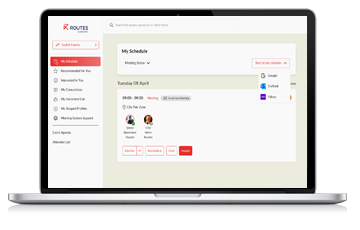
Syncing your calendar to your email platform
- Navigate to My Schedule
- Click Sync to My Calendar
- Choose your chosen email provider and log in to your account
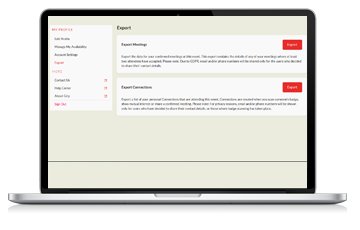
Exporting meetings and connections into Excel
- Navigate to My Profile
- Select Export from the left-hand sidebar
- Select your meetings, connections or both to export
Other features
Making connections
Connecting with your industry peers and potential new partners is critical at Routes events. With the new system, you can connect, message and exchange contact information – maximising your networking possibilities at the event and beyond.
Adding conference and networking sessions
One schedule for the event in one place. No more switching between the App and Meeting System to plan your complete agenda with our new system. You can easily add conference sessions and networking events to your calendar, whilst having a clear view of your meetings schedule.
Your queries answered
Which meetings packages are available?
To explore meeting packages for delegates within your organisation, please contact world@informa.com.
When can I start submitting meeting requests?
If you are registered as airline, airport, tourism authority or economic development organisation meetings delegate, you can request pre-scheduled meetings from 2 to 3 months before the event. Routes 360 members can request meetings a week earlier. For supplier delegates, the meeting request system will open a week before the event.
View the full access schedule above.
How do I submit meeting requests?
When the meeting request system opens you will receive an email from noreply@app.routesonline.com to provide you with access to the system. The combined Meeting and App System is available on HTML, Apple and Android devices.
View our Meeting Request Help Centre for step-by-step guidance.
If you're experiencing any issues, please speak to our team on scheduler@routesonline.com.
Meet, negotiate, and build long-standing partnerships with over 100 leading airlines during a dynamic platform that will shape your future route network. Register for Routes Americas 2026 today or contact the team on world@informa.com to find out more about meetings.
Enhance route proposals with Routes 360
With over 330 airline profiles on the platform, Routes 360 members can discover what information their target airlines want to receive, helping them to deliver enhanced route proposals and improve meeting effectiveness at Routes events. Book a demo today to see how Routes 360 can empower your route development strategy.